Interfacing
Wiring up the DHT Humidity sensors
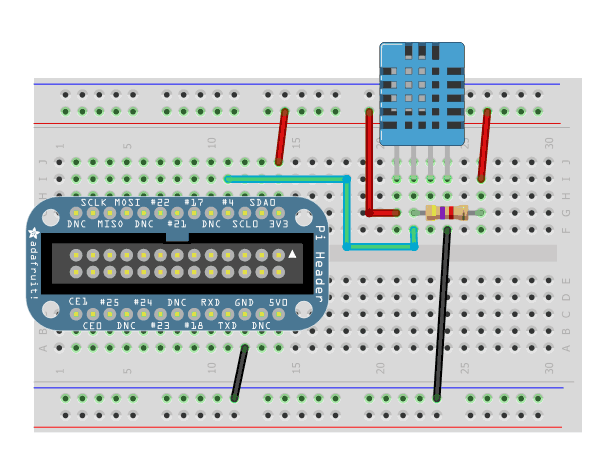
Its easy to connect these sensors to your Raspberry Pi. Our code can use any GPIO pin, but we'll be using GPIO #4 for our diagrams and code. Once you have it working, you can simply adapt the code to change to any other GPIO pin (e.g. pin #18). You can also have as many DHT sensors as you want but they cannot share the data pin - each sensor needs a unique data pin!
For DHT11 and DHT22 sensors, don't forget to connect a `4.7K - 10K` resistor from the data pin to VCC
& if 4.7K doesnt work, try 10K
Now this is the layout on a breadboard.
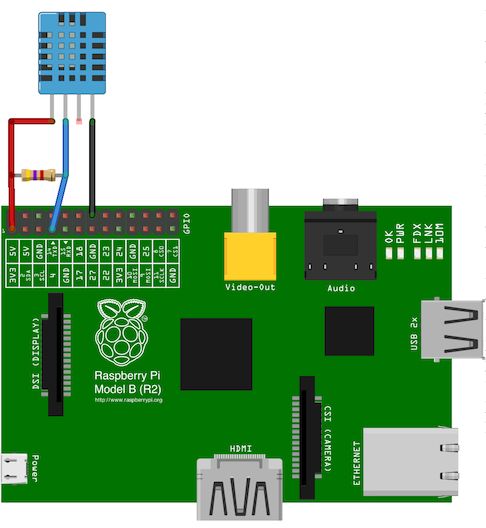
Now as an example of the wiring we have the wiring of the DHT11 to an
Older version of Raspberry pi.Here note that the connections are made to
GPO #4 as DATA IN.Along with + Vcc and GND.
Reference AdaFruit-Logging using GDocs.